

This article has been adapted with only formatting changes from a paper accepted and presented by Lenhard Reuter during CyberCon23 titled ‘Supporting Flexible and Engaging Computer Security Training Courses with the Online Learners Platform and Hands-on Exercises’ authored by Lenhard Reuter, Benjamin Akhras, David Allison, Agron Bajraktari, Ricardo Paulino Marques, Francesca Soro, Paul Smith, and myself.
Abstract
The IAEA provides training courses that have the goal of raising awareness of computer security issues that are associated with nuclear facilities and those associated with radioactive materials. As part of this goal, the courses aim to deliver affective learning outcomes — in other words, outcomes that motivate the need for computer security and change attitudes toward the topic. To help achieve this, hands-on (practical) exercises are an ingredient of courses, using equipment and systems that are representative of those found in the field and show the functional consequences of cyber-attacks. To support these outcomes, the International Atomic Agency (IAEA) and AIT Austrian Institute of Technology have initiated a joint activity to develop an online learning platform and hands-on exercises that can be hosted on a cyber range — a virtual environment, which can be used to conduct computer security exercises and training. In this paper, we present an overview of this activity and describe the Learners platform — a learning management system — and give an overview of the cyber range-based hands-on exercises that are being developed.
1. Introduction
The Covid-19 pandemic has resulted in changes in the way that we conduct business, including more use of online tools to support remote or hybrid activities. Reflecting this situation, and a more general desire to provide flexible, engaging, and sustainable computer security training courses, the IAEA and the AIT started a joint activity to develop an online training platform and accompanying hands-on exercises.
The online training platform — called Learners — allows participants of a course to complete exercises in the platform, submit their responses, and directly access virtual environments that are representative of those found in facilities. Participants require only a web browser to access Learners and the virtual exercise environments. Instructors can immediately review responses in the platform. The hands-on exercises make use of virtualized representative environments from a nuclear facility — the Asherah Nuclear Power Plant (NPP), which was developed in the IAEA CRP J02008 1 — and a facility associated with radioactive materials, a hospital. To this end, virtualized Instrumentation and Control (I&C) systems, along with virtual Physical Protection Systems (PPSs), are being developed.
In this paper, we present some of the details of the Learners platform and the hands-on exercises that are being developed, as part of this joint endeavour. The intention is to raise awareness of this activity to support the development of a community around the platform and engage Member States that would seek to use it for training. The rest of this paper is organized, as follows. In Section 2, we present an overview of cyber ranges and the open-source technologies that are being used to realize the range that is being used in our work. The Learners platform is presented in Section 3, outlining its functionality and implementation. Section 4 presents an overview of the hands-on exercises that are being developed, as part of the joint activity, and the design of the virtual exercise environment.
2. Cyber Range Technology
The virtual exercises that are being developed are intended to be deployed on a cyber range. A cyber range can be defined as “a platform for the development, delivery and use of interactive simulation environments […]” 2. In our case, the cyber range is being used to simulate representative environments that can be found in nuclear facilities and those associated with radioactive materials.
In general, a cyber range architecture can be described using three system modules (i.e., building blocks), which are shown in Figure 1. In this architecture, modules have a distinct purpose and are loosely coupled in order to make changing the underlying technologies or implementation as easy as possible. For example, it should be possible to replace OpenStack — part of the Computing Platform — with solutions from commercial providers such as VMWare vSphere. The intention is that Member States that wish to make use of the hands-on exercises can do so using a cyber range that relies on open-source software.
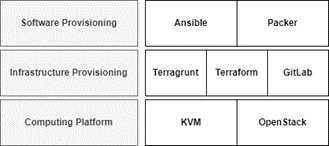 Figure 1 An overview of the building blocks of the cyber range
The implementation of the core open-source modules of the cyber range can be summarized, as follows:
- Computing Platform: At the core of a cyber range is the ability to simulate and integrate systems to build potentially complex networked infrastructures. To this end, we use OpenStack as the compute engine and the KVM hypervisor technology.
- Infrastructure Provisioning: The infrastructure provisioning module is the component that is used to create network configurations and orchestrate them on a computing platform. The range uses an infrastructure-as-code tool, called Terraform, that supports a variety of computing platforms and allows the definition of reusable complex infrastructure modules.
- Software Provisioning: The software provisioning module is used to add (and configure) functionality to virtual machines on the cyber range. In our case, the software provisioning module is implemented using a configuration management tool, called Ansible. Ansible provides the ability to define software deployments and configurations as program code templates.
The use of these technologies, such as Ansible and Terraform, enables the environments that are developed for hands-on exercises to be shared. The intention is to support knowledge exchange regarding the implementation of the cyber range with IAEA training providers, towards a common set of tools and technologies, enabling reuse of the exercises and scenarios that are developed in the project.
3. The Learners Platform
The Learners platform supports relevant stakeholders with each step of an exercise lifecycle. Starting from the development of the content by a creator (e.g., a Subject Matter Expert) to the execution of exercises by course participants, monitoring by instructors during an exercise, and post-processing.
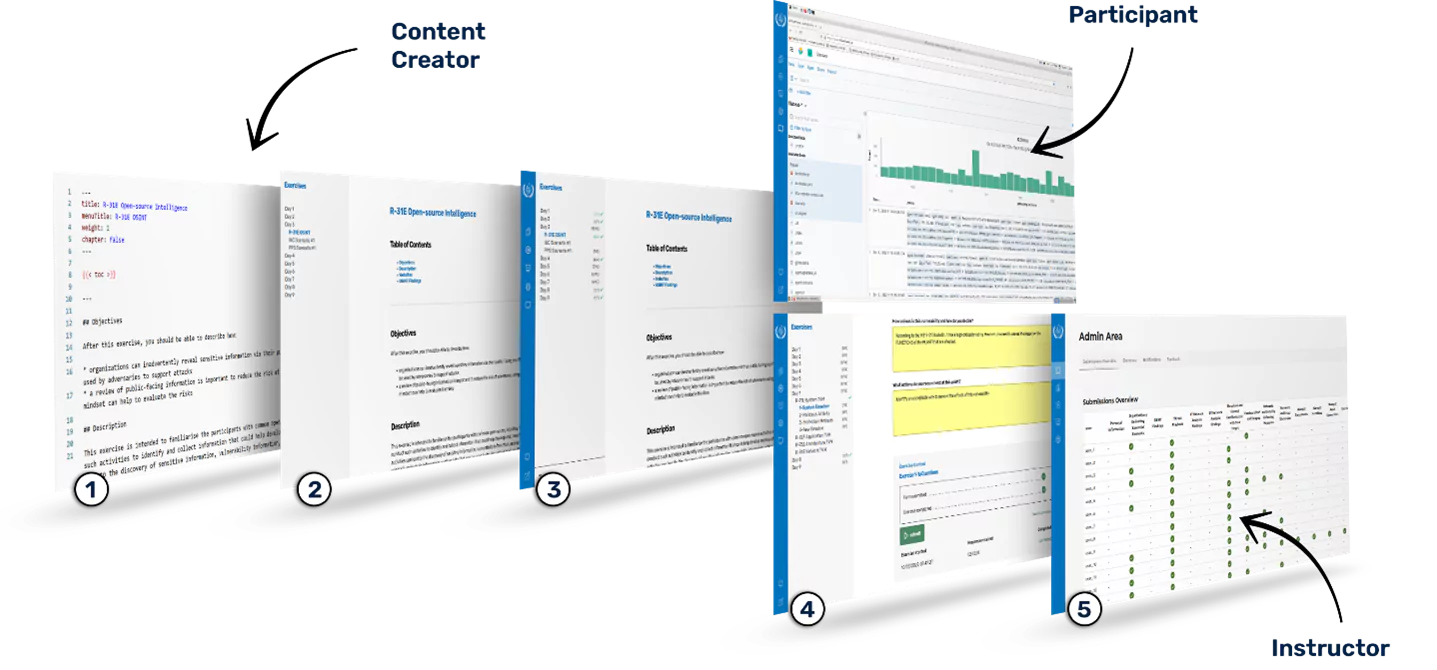 Figure 2 Learners exercise lifecycle
The Learners exercise lifecycle can be summarized, as follows, as depicted in Figure 2:
- Content is created in the freely available Markdown format. To do this any text editor and web interface can be used. Since Markdown is a plain text format, it can be integrated with version control systems, such as Git, and facilitates collaboration across multiple teams.
- The Learners platform uses the website framework Hugo to translate the Markdown-formatted exercise descriptions into rendered static web pages. By incorporating a custom Learners theme, styling is adjusted to give the content a cohesive look. In addition, so-called shortcodes are defined in the theme. These enrich the Markdown format and enable formatting features that are not natively supported. The most important role of the theme is to enable communication between the static content and the Learners backend (e.g., for submitting form data).
- The Learners application integration, consisting of a Flask backend with an SQLite database and a VUE frontend, acts as a coordinator between the content relevant to the user. The application is the central access point, requiring only a web browser, thus enabling online or hybrid exercises. This part also handles authentication and user management. The content is controlled via a sidebar and is integrated as full screen iFrames, which allows any content that is accessible via the web. This provides the possibility to integrate additional tools, e.g., for threat analysis (MITRE ATT&CK Navigator) and graphics editing (draw.io), directly into the learning environment and to use them as a part of an exercise. By using noVNC to access clients in the cyber range (see Section 4), interaction with the provisioned exercise environment is also provided directly in a participant’s web browser using one of the iFrames.
- User management distinguishes between the roles that are assigned to users. Through annotations in the content creation in Step 1, additional information can be rendered to the content pages for instructors. In addition, instructors receive an administration view (5), in which they can monitor the submissions of the participants and see an overview of their progress.
In addition to these core building blocks, there are further features that are provided by Learners:
- Multilingual support: Thanks to the use of Markdown, exercises can be submitted to translators who can perform inline translations and deploy them directly. Users have the possibility to change the displayed language in Learners.
- Two exercise types: Form exercises are textual, wherein participants answer questions and submit their responses; meanwhile, Action-based exercises, wherein the user can perform a self-paced training, e.g., setting configuration changes on the infrastructure and then initializing a check method with a submission to verify that the exercise goal has been achieved.
- Guided exercises: Learners offers the possibility to display notifications in the web browser to a course participant, which can provide step-by-step instructions or general assistance.
- Immediate feedback: It can be difficult to get direct feedback from participants about their experiences with an exercise. Learners provides support for this feature via an additional form that can be submitted directly after an exercise has been completed.
- Presentation integration: Learners offers the possibility to provide instructor presentations as a viewable PDF document, which can be linked to an interactive questionnaire.
- Multiscreen support: Participants have the possibility to open content in a new web browser tab. This allows the user to customize their exercise environment so that it is comfortable for them to perform exercises (e.g., they can show exercise information on a second screen).
4. Hands-on Virtual Exercises
Implemented in the Learners platform are twelve hands-on exercises that support several computer security learning objectives. Specifically, they inform participants about concepts that are described in IAEA Nuclear Security Series (NSS) guidance on computer security, including NSS 17-T Rev. 1 3 and NSS 33-T 4. The exercises are organized into six thematic areas that support concepts in the targeted NSS guidance documents. The learning objectives of the exercises that are associated with the six thematic areas are summarized in Table 1.
Table 1 The hands-on exercises thematic areas and associated learning objectives
| Thematic Area | Exercise Objectives |
|---|---|
| Normal Operations | The objective of these exercises is to enable the participants to develop an appreciation of the types of systems that are associated with nuclear I&C systems and how they can be used to support facility functions. |
| Functional Impact | The exercises in this thematic area highlight how cyber-enabled adversaries can impair the function of systems, which could lead to nuclear safety and security consequences. |
| Risk Informed Approach | IAEA NSS computer security guidance advocates taking a risk-informed approach to computer security, which aligns computer security requirements with the consequences of compromise on nuclear security, safety, and emergency preparedness. In this thematic area, there are exercises that explore this approach. |
| Technical Vulnerability Management | Technical Vulnerability Management (TVM) is a major undertaking in facilities; this thematic area provides participants with the opportunity to engage in practical TVM activities, such as system hardening, as well as gaining an appreciation of the broader computer security programme aspects of this important activity. |
| Defensive Computer Security Architecture | This thematic area informs participants about how risk informed security requirements can be realized via a Defensive Computer Security Architecture (DCSA). Practical activities that are associated with DCSA implementation are performed, such as configuring zone boundary points (e.g., firewalls). |
To support these exercises, a bespoke simulated (or virtual) environment is being built that can be deployed on a cyber range. This environment is depicted in Figure 3 and can be summarized, as follows. The environment is organized into two areas — a management and participant area. The management area consists of systems and services that are needed to implement the exercises; a single instance of this area is deployed per course. Meanwhile, the participants area is instantiated per participant or participant group and represent systems that can be found in facilities.
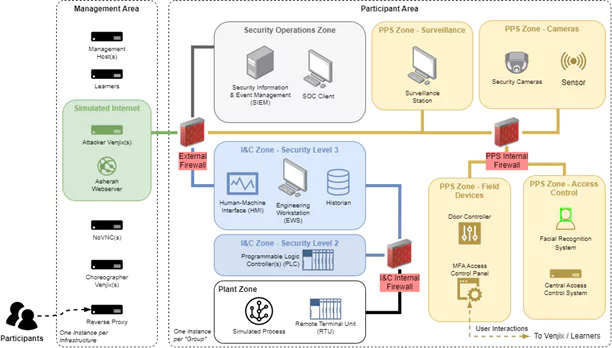 Figure 3 An overview of the virtual exercise environment that will be used to support the hands-on exercises
In the management area, there are several services and systems: participants connect to the environment using a standard Web browser via a reverse proxy, which redirects them to the Leaners platform. In addition to being able to access the exercises via Learners*,* the participants can access via their web browser the systems in the participant network, such as the Security Operations Centre (SOC) client. This is enabled using a noVNC server that is hosted in the management network. The Asherah Webserver is used to host a collection of web pages that are associated with the Asherah NPP. These are used for the OSINT exercise, as discussed in Table 1.
There are two further noteworthy services that are hosted in the management area — Venjix and the Choreographer. Venjix is used to execute scripts that, for example, perform cyber-attacks against systems in the participant networks. These scripts are invoked from the Learners platform (as part of action-based exercises) in response to interactions from participants and provide a way to hide the implementation of attacks from participants. The Choreographer is a service that interacts with Venjix and the systems in the participant areas, such as door controllers and security cameras, in order to emulate the real-world consequences of interactions with physical protection systems. For example, if a participant successfully completes multi-factor authentication that opens a door, a surveillance camera that is associated with the area where the door is located should show a person going through the door. This logic is implemented in the Choreographer, which invokes interfaces that are exposed on the systems in the participant areas (e.g., to play a video).
Regarding the participant networks, there are three sets of zones — those associated with I&C and the management and control of processes in the Asherah NPP; a set of zones that emulate a physical protection system; and computer security operations. In all cases, open-source and free-to-use software is used to implement the systems and services in these zones. For example, the Plant HMI will be implemented using ScadaLTS, the PLC and the software that is used to program it will be implemented using OpenPLC and its Editor software, respectively. Meanwhile, the Asherah Nuclear Simulator (ANS) 5, which was developed in IAEA CRP J02008, will be used to realize the simulated process. The use of the ANS enables participants to observe facility level consequences of cyber-attacks to I&C systems and is important for the affective learning outcomes that we are targeting. The ANS is available to IAEA Member States, on request. For the physical protection systems, custom program code is being implemented in order to create representative facsimiles of devices and systems.
5. Conclusion
The Covid-19 pandemic made it very challenging — if not impossible — to conduct training engagements wherein participants had physical access to representative equipment. Triggered by this challenge and a more general desire to make training courses more sustainable and flexible to execute, the IAEA and AIT engaged in a project to develop the hands-on exercises that are presented in this paper. This initial endeavour will conclude in 2023 and will result thereafter in the exercises and Learners being available to IAEA Member States. Future work will focus on growing a community of users and developers around this initiative to increase its maturity and garner wider interest.
References
-
International Atomic Energy Agency, Enhancing Computer Security Incident Analysis at Nuclear Facilities, Available online: https://www.iaea.org/projects/crp/j02008 ↩︎
-
ECSO. Understanding cyber ranges: From hype to reality. Technical report, European Cyber Security Organisation, March 2020. ↩︎
-
International Atomic Energy Agency, Computer Security Techniques for Nuclear Facilities, IAEA Nuclear Security Series No. 17-T (Rev. 1), IAEA, Vienna (2021) ↩︎
-
International Atomic Energy Agency, Computer Security of Instrumentation and Control Systems at Nuclear Facilities, IAEA Nuclear Security Series No. 33-T, IAEA, Vienna (2018) ↩︎
-
R.A. Busquim e Silva, J.R.C. Piqueira, J.J. Cruz, R.P. Marques, Cybersecurity Assessment Framework for Digital Interface Between Safety and Security at Nuclear Power Plants, International Journal of Critical Infrastructure Protection, Volume 34, 2021, 100453, ISSN 1874-5482, https://doi.org/10.1016/j.ijcip.2021.100453. ↩︎